
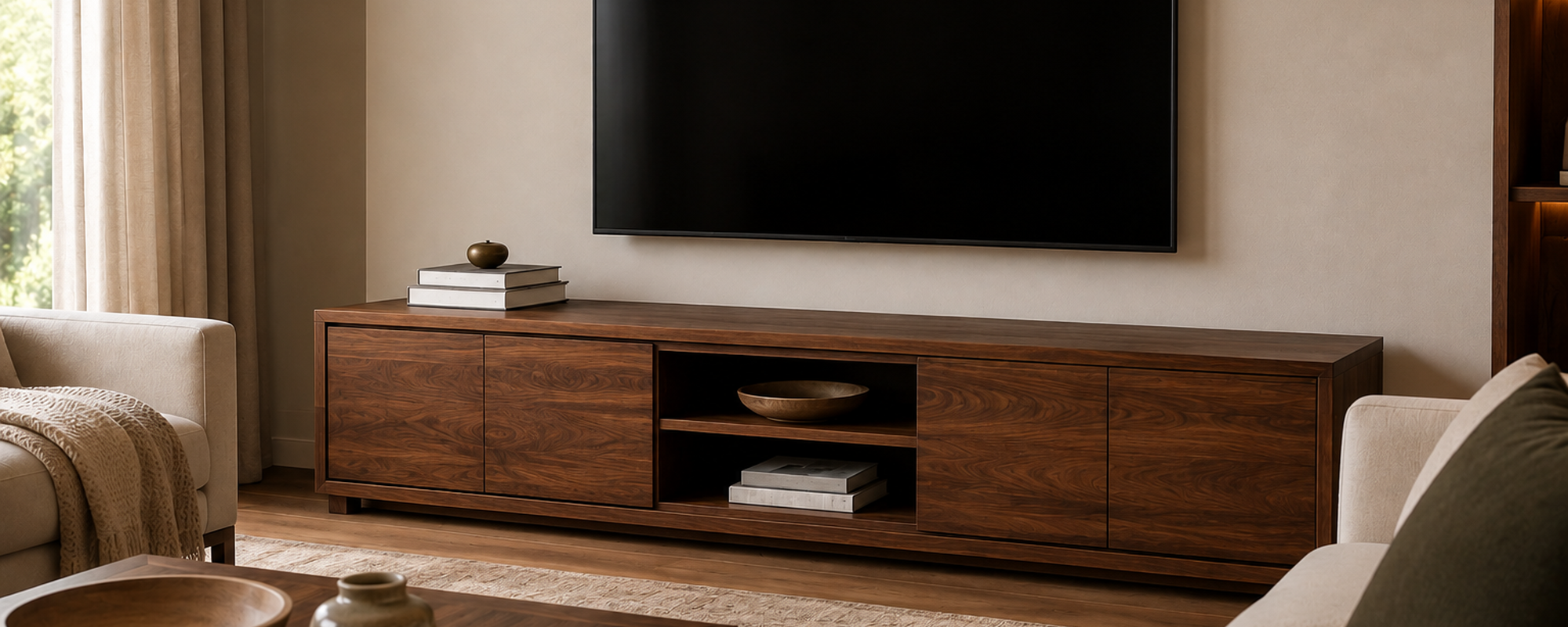
A TV stand has a styling problem most other furniture doesn't: it has to look good around a large, flat, black rectangle that isn't going anywhere and can't really be disguised. Random decorative objects scattered around the base don't solve that problem - they just add clutter next to a screen that's already the most visually dominant thing in the room. Decorating a TV stand well is really about managing that dominant screen deliberately, not styling around it as an afterthought.
Start with Scale: Choose the Right TV Stand Before You Style It
Before any styling decision, the stand itself needs to be proportioned correctly to the TV and the room - this matters more here than with almost any other piece of furniture, because the mismatch is obvious every time the TV is on.
As a general guideline, a TV stand looks best when it's somewhat wider than the television sitting on it - enough that the TV doesn't visually overhang the edges - and low enough that the screen's center sits at a comfortable eye level from where you typically sit. A stand that's noticeably narrower than the TV makes the whole setup look unstable, even when it's structurally fine; a stand that's excessively wide relative to the TV can leave the ends looking empty and disconnected from the screen above them.
Storage needs matter too. A stand with some enclosed storage (drawers or cabinet doors) gives you somewhere to put game consoles, cable boxes, and remotes out of sight, which makes the styling of the visible surface considerably easier - there's simply less that has to be managed in the open.
Visual Balance Around a Dominant Black Screen
The single biggest challenge in styling a TV stand is that the screen is large, dark, and impossible to visually soften - so the goal isn't to compete with it, it's to balance it.
A few reliable approaches:
Style to the sides, not directly beneath the center of the screen. Objects placed right under the middle of the TV tend to get visually swallowed by it. Grouping decor toward the ends of the stand, framing the TV rather than sitting underneath it, generally reads better.
Use height to create a visual counterweight. A tall plant, a stack of books, or a piece of vertical decor on one side of the stand gives the eye something to travel to besides the screen, which is otherwise the tallest, darkest object in the immediate area.
Keep colors and materials that echo the room, not the screen. A black screen already introduces a strong dark element into the room; styling with warm wood tones, natural textures, and lighter colors around it provides contrast rather than adding more dark, flat surfaces nearby.
Symmetry vs. Asymmetry
Both approaches work, and which one suits a given room mostly comes down to overall style rather than a fixed rule.
Symmetrical styling - matching or similar objects placed on each side of the TV, like two lamps or two matching plants - tends to suit more traditional or formal rooms, and it reads as calm and orderly. It's also the more forgiving option if you're not confident about styling instinctively, since matching pairs are hard to get visually wrong.
Asymmetrical styling - a taller grouping on one side, something lower and different on the other - tends to suit more relaxed, eclectic, or contemporary rooms, and it generally looks more personal and less like a matched set. It requires a slightly better eye for balance, since the two sides need to feel weighted evenly even though they're not identical.
Neither approach is more "correct." A formal living room with a symmetrical furniture layout usually looks better with symmetrical TV stand styling to match; a more relaxed, collected room usually suits the asymmetrical approach better.
Cable and Device Management
This is the least glamorous part of TV stand styling and also the part that does the most to prevent a good-looking setup from feeling undermined by visible clutter.
-
Route cables behind the stand or through a cable management channel where possible, rather than letting them hang visibly along the back or sides
-
Use cable ties or clips to bundle cords that do have to be visible, so they read as one manageable bundle rather than a tangle
-
Keep frequently used devices (a game console, a cable box) in open storage where you can reach them, but route their cables neatly
-
Use enclosed storage for anything you don't need to access often - spare cables, older devices, chargers - so they're not visually competing with the styled surface
A TV stand can be styled perfectly on top and still look cluttered if the cables underneath are a visible mess - this is genuinely one of the more overlooked parts of getting the whole setup to feel finished.
Open vs. Closed Storage
Most TV stands offer some mix of both, and knowing what to put where makes styling considerably easier.
Open shelving (visible shelves or cubbies) works best for the objects you actually want people to see: styled books, a few decorative pieces, maybe a speaker if it's part of the aesthetic rather than something to hide. Anything placed here should be treated the same way you'd style a shelf - with the same height variation and grouping principles that apply to a coffee table.
Closed storage (drawers, cabinet doors) is where the visual clutter should actually live: remotes, game controllers, cables, chargers, anything functional but not attractive. The point of closed storage isn't just tidiness - it's that hiding the genuinely unattractive functional items is what makes the open, styled surfaces above look considered rather than staged around a mess just out of frame.
What Not to Put Around Electronics
A few practical notes worth including, since a TV stand isn't purely a decorative surface:
-
Avoid tall, top-heavy decor directly next to the TV that could tip against the screen
-
Keep candles or anything with an open flame away from cables and electronics
-
Leave enough clearance around any ventilation points on the TV or connected devices - decor stacked too close can block airflow
-
Skip anything highly reflective directly across from the screen if glare during viewing is a concern
Styling to Match Your Room's Overall Style
The same TV stand can take on a different look depending on the room around it. While the principles of balance and cable management remain the same, the decor and accessories you choose should complement the room’s overall style rather than feel like a separate decorating exercise. The same approach applies when learning how to style a console table or other living-room furniture, where each piece should feel connected to the space as a whole.
In a rustic or modern rustic room, lean on the same materials already established elsewhere in the space: a woven basket for remotes instead of a plastic bin, a stack of books with natural linen or cloth covers, a small plant in an unglazed ceramic pot. The goal is for the TV stand styling to look like it belongs to the same room as the sofa and coffee table, not like a separate styling exercise.
In a more minimal or contemporary room, fewer objects generally read better - a single plant and one small sculptural object on either side is often enough, with more of the visual interest coming from the stand's own material and proportions rather than from added decor.
In a more eclectic or collected room, asymmetrical styling with a wider mix of textures and object types tends to fit naturally, since the room's overall aesthetic already embraces variety rather than uniformity.
The point isn't to follow a strict formula for each style - it's that TV stand styling shouldn't be treated as a separate decorating task from the rest of the room. Whatever materials, colors, and level of restraint you've used elsewhere should carry over here too. especially when choosing living room furniture.
How to Avoid Visual Clutter
The same principles that apply to coffee table decor ideas apply here, with one addition specific to TV stands: resist the urge to fill the entire width of the stand. Because a TV stand is often wider than a coffee table, there's a temptation to style the whole surface edge to edge. Leaving genuine open space - not just gaps between objects, but real breathing room - is what keeps a wide stand from feeling like it's compensating for the screen rather than complementing it.
A simple check: if you can't easily reach the remote or set down a drink without moving three decorative objects first, the stand is over-styled relative to how it actually gets used.
How to Decorate a TV Stand FAQ
What should I put on a TV stand besides the TV?
A workable approach is books or a small stack of decor on one side for height, a plant or vertical object on the other for balance, and closed storage (drawers or cabinets) for cables, remotes, and devices you don't want visible. Keep the area directly under the screen relatively open.
How do I decorate a TV stand without it looking cluttered?
Style toward the ends rather than the center, vary the height of objects so nothing reads as flat, and route or bundle visible cables rather than leaving them loose. Leaving real open space on the surface - not filling it edge to edge - is one of the simplest ways to avoid a cluttered look.
Should TV stand decor be symmetrical or asymmetrical?
Either works, and it mostly depends on the rest of the room. Symmetrical styling (matching objects on each side) suits more formal or traditional rooms; asymmetrical styling (varied height and grouping on each side) suits more relaxed or eclectic spaces.
What size TV stand should I get?
As a general guideline, choose a stand somewhat wider than your TV so the screen doesn't visually overhang the edges, and low enough that the screen sits at a comfortable eye level from where you typically sit.
Share:
How to Anchor Tall Furniture Without Damaging the Wood
When Is Custom-Sized Furniture Worth the Investment?