
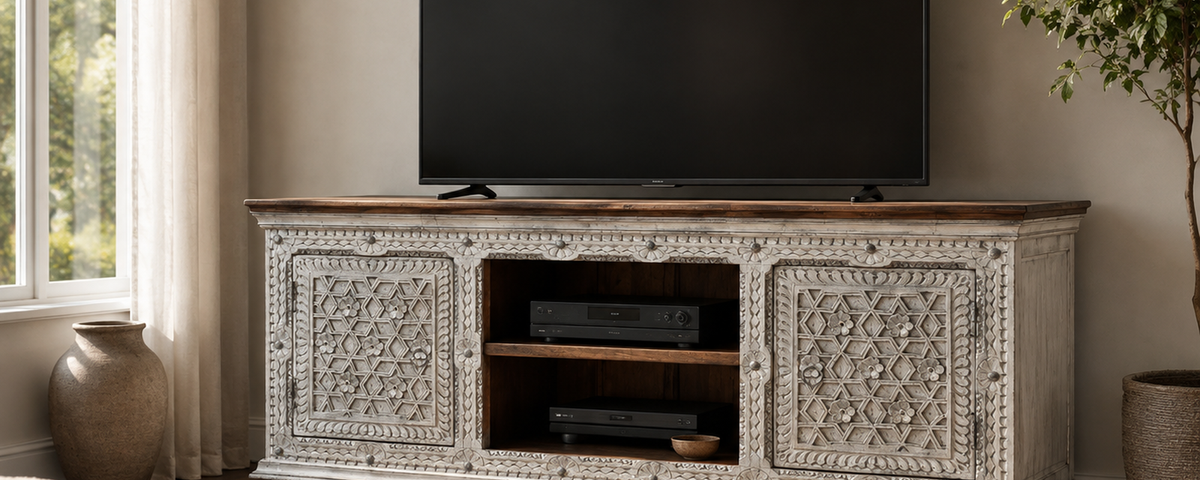
A media console can look flawless in a showroom photo and still turn into a visible tangle of cords within a week of connecting a TV, a streaming box, a game console, and a soundbar. The challenge usually isn't the furniture itself - it's matching your cable-routing method to the console's construction. Rear cutouts, open shelving, and solid back panels each call for a different approach.

The Key Question
Before worrying about cord sleeves or power strips, answer one thing first: does your console already have a rear cable cutout, or are you working with a solid back panel? The right approach depends on the answer.
What Actually Matters
Rear Cable Cutouts
Many solid wood consoles - including closed-cabinet pieces like the Canyon Large Solid Wood TV Cabinet and Alpena Rustic Ornate Wooden TV Cabinet - are built with a rear cutout for cable routing and airflow. If your console has one, the job is mostly about using it well: route your cables through that single opening rather than letting them spill out around the console's sides or over the top edge, where they stay visible from the seating area.
No-Drill Options for Solid-Panel Consoles
If your console doesn't have a cutout - whether it's an older piece or a solid-backed cabinet by design - drilling into show wood isn't necessary and can introduce unnecessary risk to the finish. Adhesive cable raceways or channels can run along the back edge of the console, out of the sightline from the front and sides, without a single hole in the wood. This won't look as seamless as a true cutout, but it keeps cables off the floor and out of view from normal seating positions.

Bundling and Routing Inside the Cabinet
However the cables get to the console, bundling matters as much as the entry point. Group cables with reusable hook-and-loop ties rather than letting each one run its own path, and route the bundle along the inside back or side wall of the cabinet rather than across open shelf space where it's visible through glass doors or open shelving.
Matching the Method to Your Console
|
Console Type |
Recommended Approach |
|
Open shelf console (no doors) |
Cord clips or sleeves along a rear leg; no drilling needed |
|
Closed cabinet with a rear cutout |
Route bundled cables through the cutout; avoid spilling cables around the cabinet's sides |
|
Closed cabinet, no cutout (solid back panel) |
No-drill adhesive cable channel along the back edge, out of the front sightline |
|
Wall-mounted TV with a console below |
A floor-level or in-wall cord cover from the outlet to the console, kept separate from the console's own routing |
 A ventilation consideration worth planning around before you fully enclose anything: streaming boxes, game consoles, and receivers can run warm, and sealing them into a closed cabinet without adequate airflow can affect their performance over time. A console that pairs open-shelf storage for the devices themselves with closed sections for controllers and accessories can provide better airflow without sacrificing a clean look. If your setup is fully enclosed, leaving cabinet doors open during extended use is a practical middle ground.

Common Mistakes
-
Drilling into show wood without checking what's behind it. A cutout added after the fact can hit internal bracing or a joint - if your console lacks one, a no-drill option avoids unnecessary risk to the furniture.
-
Running every cable through one small opening without bundling. Loose, unbundled cables can kink and tangle even when they're technically hidden.
-
Fully enclosing a warm-running device for convenience. A tidy look isn't worth reduced performance from inadequate airflow.
-
Using weak adhesive hooks or clips for a heavy cable bundle. Lightweight adhesive hardware can fail under the combined weight of several cables over time.
Practical Checklist
-
Check whether your console has a rear cable cutout before planning a routing method
-
Bundle cables with reusable ties rather than routing each one separately
-
Use a no-drill adhesive channel if your console has a solid, uncut back panel
-
Keep warm-running devices on open shelving or leave doors ajar during extended use
-
Route the outlet-to-console cable separately if the TV is wall-mounted
-
Avoid drilling into a piece without confirming what's behind the panel first
Conclusion
Hiding TV wires in a solid wood console comes down to matching the method to what your specific piece already offers - a rear cutout, a solid back panel, or an open-shelf design - rather than assuming one universal trick works everywhere. Get that match right, and the cable management disappears the way it should, without adding a hole to a piece that wasn't built for one.
If you're choosing a new console with cable management in mind, Oak & Loom's TV stands and cabinets collection includes closed-cabinet pieces built with rear cable cutouts, such as the Canyon Large Solid Wood TV Cabinet. If you have questions about a specific setup, reach out through contact us.
Frequently Asked Questions
Can I add a cable cutout to a solid wood console after it's been delivered?
It's possible, but cutting into a finished piece carries real risk to the panel's structure and finish if the location or method isn't appropriate. It's worth asking the maker whether a cutout can be added during production instead, particularly for a custom order.
Does hiding equipment inside a closed cabinet cause it to overheat?
It can, if the cabinet is fully sealed and the device runs warm during extended use, such as a game console. Pairing enclosed storage with at least some open shelving, or leaving cabinet doors ajar during heavy use, can reduce this risk.
What's the safest way to run a cable from a wall outlet to a console that isn't against the wall?
A floor-level cord cover or a properly installed in-wall cable-routing solution can keep the cable off the walking path. Keep this routing separate from the console's own internal cable management rather than relying on the furniture to conceal the entire run.
Do all solid wood TV consoles include rear cable cutouts?
No. Cutouts are common on many closed-cabinet designs but aren't universal, especially on older or fully solid-backed pieces. Check a specific product's description or ask the retailer directly before assuming one is included.
Share:
How Much Weight Can a Solid Wood Bookcase Hold?